Support Requests
Support Requests are created when a visitor needs human assistance—typically when the chatbot cannot confidently answer their question. These serve as both customer service tickets and potential sales leads.
When are Support Requests created?
The chatbot automatically offers to create a Support Request when:
- •It cannot find a relevant answer in the knowledge base
- •The query is too complex or ambiguous
- •The visitor explicitly asks to speak with a human
When triggered, the bot: Asks for contact information (name, email, phone), requests preferred contact method, collects issue description, and creates the Support Request.
Viewing Support Requests
- 1.Click Support Requests in the left sidebar
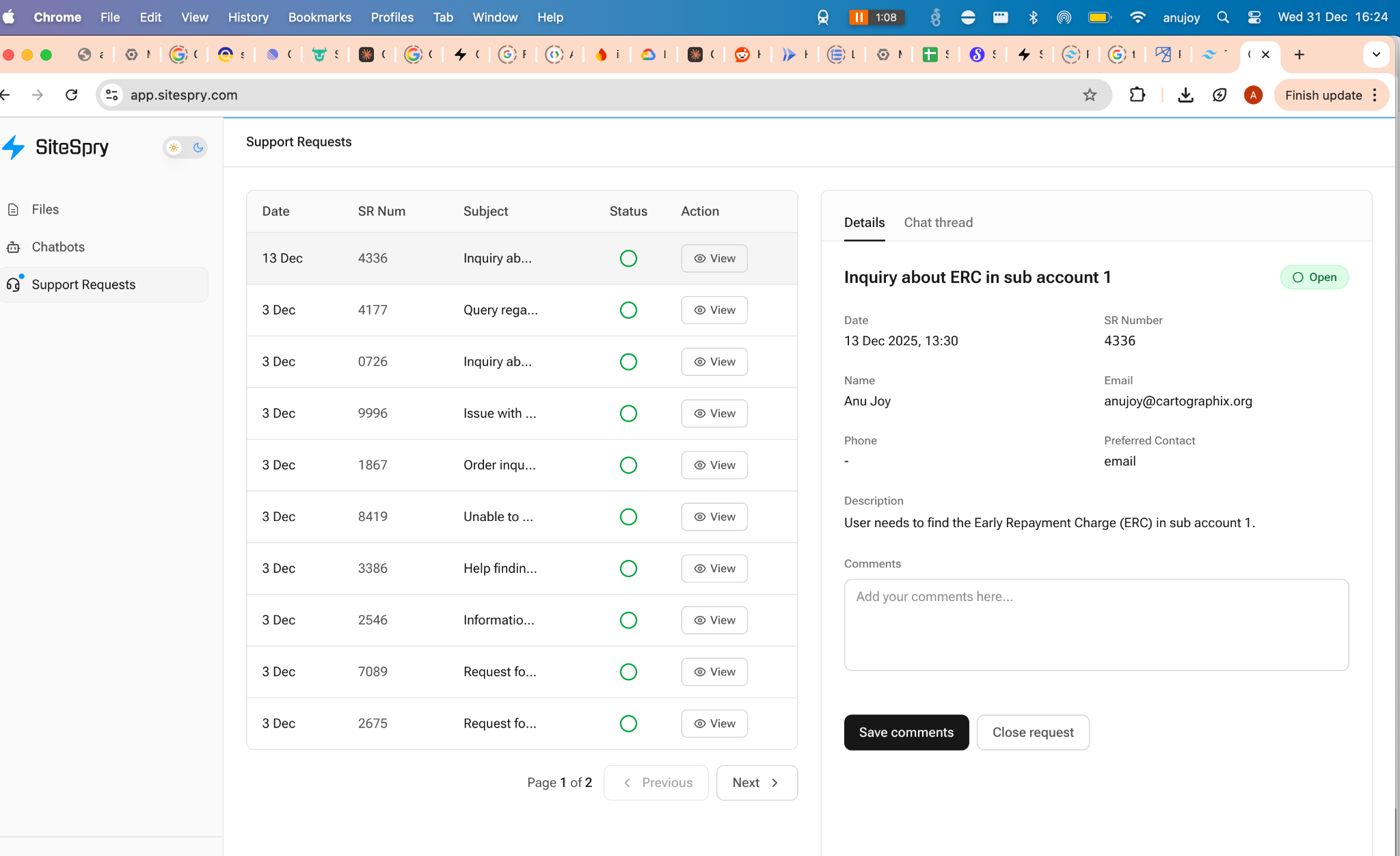
- 2.View the list of all requests with Date, SR Number, Subject, Status, and Action columns
- 3.Click View to open request details
Working with a Support Request
Click View to open the details panel showing:
Request Information
- • Date and SR Number
- • Visitor name and email
- • Phone (if provided)
- • Preferred contact method
- • Issue description
Comments Section
Add internal notes about actions taken
Chat Thread Tab
View the full conversation that led to the Support Request
Workflow:
- 1.Review visitor details and description
- 2.Contact visitor using preferred method
- 3.Add notes in Comments field
- 4.Click Save comments
- 5.Click Close request when resolved
Using Support Requests as leads
Support Requests are valuable sales opportunities:
- ✓Qualified leads: Visitors engaged enough to provide contact info
- ✓Context-rich: You know exactly what they're looking for
- ✓Immediate: Real-time notification of potential customers
- ✓Actionable: Contact details ready for follow-up